Reporting software for distributed sites and facilities
Mark-a-Spot connects every report to the right site: via QR code, photo, map or automatic assignment. Built for counties, facility teams, public institutions and organizations with many locations.
Schools, stations, sports halls, shelters, administrative buildings, depots and yards land in one view. With reporting per site instead of scattered emails, phone calls and spreadsheets.
- Open311 compatible
- GDPR compliant
- Open source backend
- Self-hosted option
- AI-assisted
- Multi-tenant
Many sites, no shared overview
Reports today arrive over phone, email, WhatsApp, log books or spreadsheets. Photos, the exact location, the responsible site and the priority are usually missing. With 20, 50 or 200 sites this never adds up to a single picture. Facility managers, operators and administrations lose time on follow-up questions.
No central overview
Which site has the most open issues, where work is stalling and where to act first stays invisible when the information is spread across five inboxes.
Reports across five channels
Phone, email, WhatsApp, log book, spreadsheet. Every site uses its own route. Sorting and triage happen after the fact, on top of day-to-day work.
Site and asset reference missing
Without a structured reference to a school, station, shelter or building, a report cannot be analysed cleanly or routed reliably.
Not everyone on site reports
Caretakers, educators, principals, staff, parent councils. Many people want to flag issues, few find the right channel. As a result, part of the feedback never arrives.
One reporting channel for every site
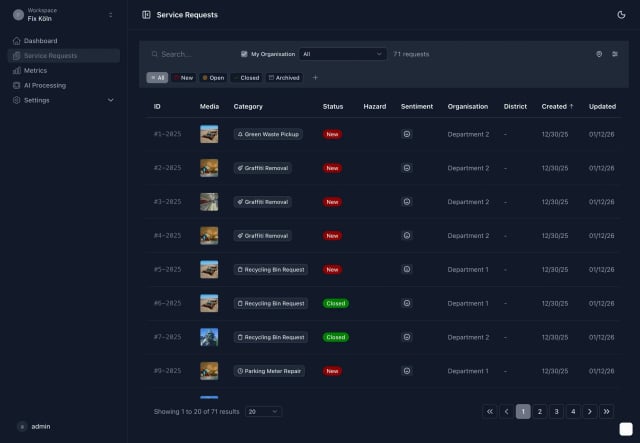
Every report stays georeferenced and is additionally tied to a site, building, asset or facility. The site can be detected automatically or pre-selected via QR code, direct link or form picker. All reports land in one dashboard, filterable by site, category, status and assignment.
Mark-a-Spot in five steps
- Report
- Classify
- Route
- Process
- Analyse / Integrate
Automatic site assignment
When a report is placed near an active facility, Mark-a-Spot can attach that facility automatically. Nothing changes for the person reporting; internally, a structured link to the site is created.
Example: a citizen reports a broken light in front of a school. The report automatically picks up the school site reference and shows up in the facility manager's overview.
Pre-selected site
For internal or semi-public reporting paths a site can be pre-selected directly, for example via QR code, dedicated link or form picker. Address and coordinates are filled in automatically.
Example: a daycare operator with 40 centres gives each site its own reporting link or QR code. The on-site team files reports for the right facility in seconds.
Three paths to a site report
QR code per site
Each site gets its own QR code. Whoever scans it lands on the matching form with the site pre-selected. Ideal for schools, sports halls, stations, administrative buildings, shelters or depots.
Direct reporting link
For internal portals, posters, emails or intranets, each site can have its own reporting link. Open directly, no in-form search required.
Pick in the form
If no QR code is used, the reporter can choose the site in the form or on the map. With search, icons and tenant-specific labels.
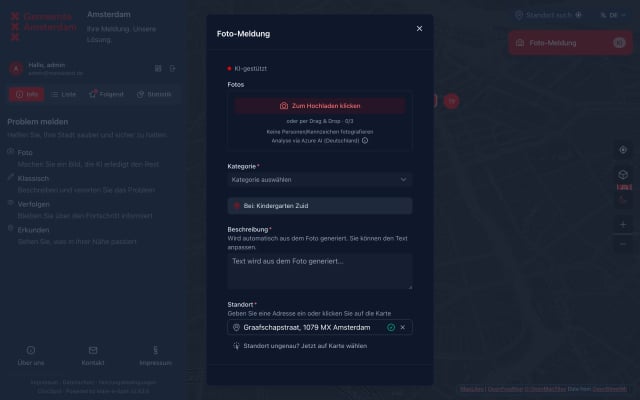
The site shows what the report belongs to. The map shows where exactly inside or near the site it was reported. Depending on the setup the stored coordinate can be the site coordinate itself or a more precise point: an entrance, platform, courtyard, sports hall, workshop or bike rack. On top of that, the matching facility is stored as a structured reference.
Manage sites, buildings and facilities in one place
In Mark-a-Spot every reportable site is maintained in one place: schools, daycare centres, stations, sports halls, administrative buildings, shelters, depots and other facilities. For each site you can store name, address, coordinates, status, icon, description and dedicated reporting links.
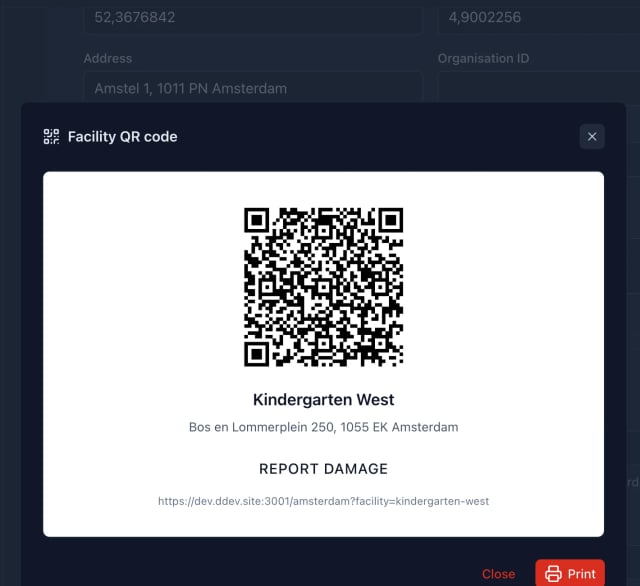
QR codes and report links per site, generated from the admin
Each facility gets its own QR code and its own reporting URL automatically. Print the code as a sticker for the entrance, the platform or the gym hall, or share the link in intranets, mailings and on internal pages. Whoever scans or clicks lands on the form with the right site already pre-selected.
Incident reporting for buildings and facilities, with precise placement inside the perimeter.
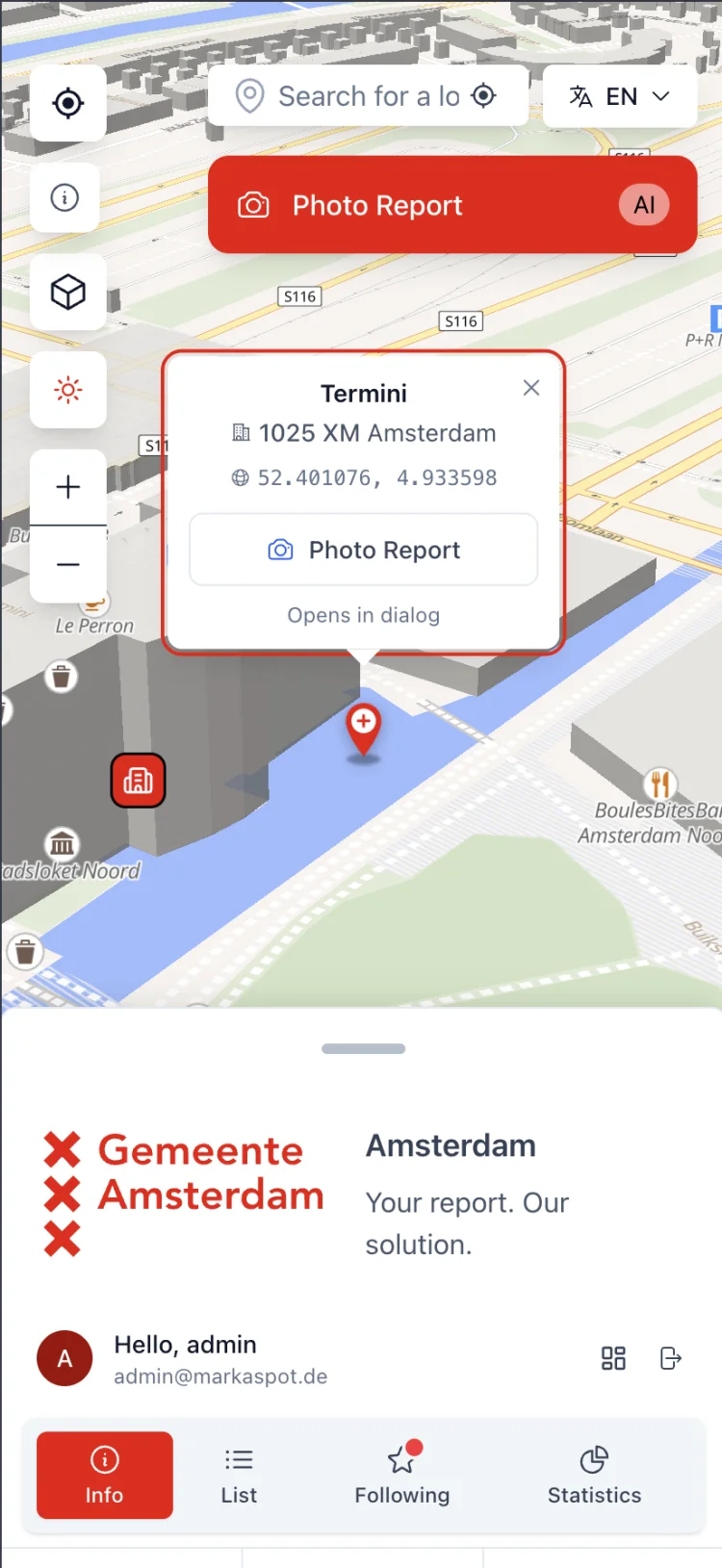
The map shows the spot, the site shows the facility. Reporters drop the pin even inside the perimeter: entrance, courtyard, sports hall, school garden. Operators and administrations see exactly which facility a report belongs to.
Import site lists easily
Sites, buildings and facilities can be created manually or imported from existing lists, for example via CSV. That gives you a clean basis for QR codes, pre-filled forms, automatic assignment and per-site reporting.
Clear structure per site
Name, address, coordinates, icon, status and dedicated reporting links. Enough information to route reports cleanly without rolling out a second CAFM system.
Precise location inside the site
Even with a site reference the map stays precise. Entrance, platform, courtyard, sports hall, workshop or bike rack can be placed directly on the map.
Inside the existing tenant
A site is not a separate tenant. It is an additional reference on the report. The existing tenant model, routing and Open311 behaviour remain untouched.
Which sites is Mark-a-Spot built for?
Schools and daycare centres are only part of the picture. Mark-a-Spot is built as a reporting layer for any organization that runs many sites.
Schools & daycare centres
School operators, daycare networks and municipal facility teams capture reports per site while keeping the bigger picture in view.
Stations & mobility hubs
Railway stations, stops, bike-and-ride and mobility hubs. Reports arrive with a reference to the matching site and can be triaged at once.
Sports halls & community venues
Sport and multipurpose halls, clubhouses and outdoor venues. Caretakers, clubs and administrations use the same channel.
Shelters & social facilities
Shelters, residential homes and social facilities. Reports stay in a sensitive context, without a freely placed pin but with a clear site reference.
Administrative buildings
Town halls, branches, citizen offices and service buildings. One channel for internal issues like lighting, heating, locks or cleanliness.
Yards & depots
Public works yards, workshops, depots and logistics sites. Internal reporting for teams that move between multiple locations.
Residential sites
Municipal housing stock and residential sites as an adjacent use case. Each complex can be managed as its own site.
Campuses & research facilities
Universities, research facilities and campuses with many buildings. QR codes per building or lecture hall keep reports sorted.
Public facilities & infrastructure
Libraries, cemeteries, swimming pools, playgrounds and other municipal sites. Site context without a separate specialist software.
Complements your CAFM, does not replace it
Mark-a-Spot is not a heavy CAFM system. It is the lightweight reporting and triage layer in front of existing systems.
People on site report defects, issues and observations with photos, QR codes and site references. Administrators see all reports in one dashboard, filter by site, status or category and forward data through Open311, exports or integrations. Your existing CAFM, ticketing system, DMS or specialist software stays in place. Incoming reports just become more structured, faster to process and easier to route.
In front of the CAFM
Low-threshold reports with photo, location and category. No additional licence required for the people on site.
Triage and classification
AI-assisted categorization and prioritization. Administrators decide what is forwarded into the CAFM or specialist system.
Interfaces and export
Open311, CSV export and integrations forward structured reports to CAFM, ticketing or DMS.
Ideal for counties, operators and distributed facilities
A county or operator usually manages more than a single address. It might be schools, sports halls, daycare centres, shelters, administrative branches, yards and depots. With Mark-a-Spot every site gets its own reporting link or QR code. Reports land centrally but stay analysable per facility. The result is a shared overview across 20, 50 or 200 sites, without email chaos and without a new CAFM project.
Why Mark-a-Spot?
Mark-a-Spot combines a low-threshold reporting channel with an open technical architecture. The backend is open source, the interfaces stay open and operations are possible as managed cloud, self-hosted or through a partner. That makes Mark-a-Spot suitable not just for classic citizen reporting but also for distributed site and facility processes. The premium staff dashboard UI is the Pro edition (commercial CivicSpot/Enterprise edition); everything it surfaces, including analytics, routing, AI and vision, belongs to the open-source core.
Dashboard for administrations and operators (Pro)
One view across every site, with filters by site, category, status and assignment.
AI categorization and prioritization
Incoming reports are classified and prioritized automatically. Manual sorting becomes the exception, not the rule.
Multi-tenant for counties
Multiple facilities, operators or sub-organizations can be managed separately, analysed together and branded individually.
Open311 API
Standardized API for citizen reports and machine-to-machine handover to CAFM, specialist systems or third-party tools.
CSV, export and integrations
Structured data can be exported, processed and integrated with existing systems through open APIs.
Open source backend
Drupal-based backend under an open licence. Source code transparent, no black box, extensible through partners.
Cloud, self-hosted or partner
Managed cloud, your own infrastructure or operation through a partner. You decide where the data lives.
GDPR compliant
Data minimisation, clear roles and permissions. Suitable for municipal and public-sector structures.
Emergency mode for crises
Dedicated mode for floods, storms and crisis situations. Switched on quickly without rolling out separate software.
No vendor lock-in
Open interfaces, exportable data and an open-source foundation. You stay interoperable at any point.
Additive to existing Mark-a-Spot instances
Mark-a-Spot extends existing instances with site management and a structured site reference. Existing reporting paths, tenants, routing logic and interfaces remain untouched.
Open311 compatible
Existing Open311 endpoints stay usable. Every report still carries a coordinate and address. The matching facility can additionally be passed as a structured reference.
Configurable per tenant
Each tenant can use its own sites, labels, icons and rules. The radius for automatic assignment is freely configurable.
Automatic snap to nearest site
If a report falls within a configurable radius of an active site, that site is attached automatically. Outside the radius the report remains without a site reference.
Frequently asked questions
Related topics
From the citizen reporting front door to the staff dashboard and crisis mode. Mark-a-Spot covers more than the facility use case.
Demo with your own site list
Would you like to see how Mark-a-Spot works with your own facilities? Send us a short site list, for example 10 schools, buildings, depots or other facilities. We will show you how reports are captured, filtered and analysed per site.